
MCP Toolkit Editor
Author, validate, preview, and export MCP Description (mcpdesc) documents — entirely in your browser.
Pure client-side. No account, no backend. Your document never leaves your device.
Opens editor.mcptoolkit.org
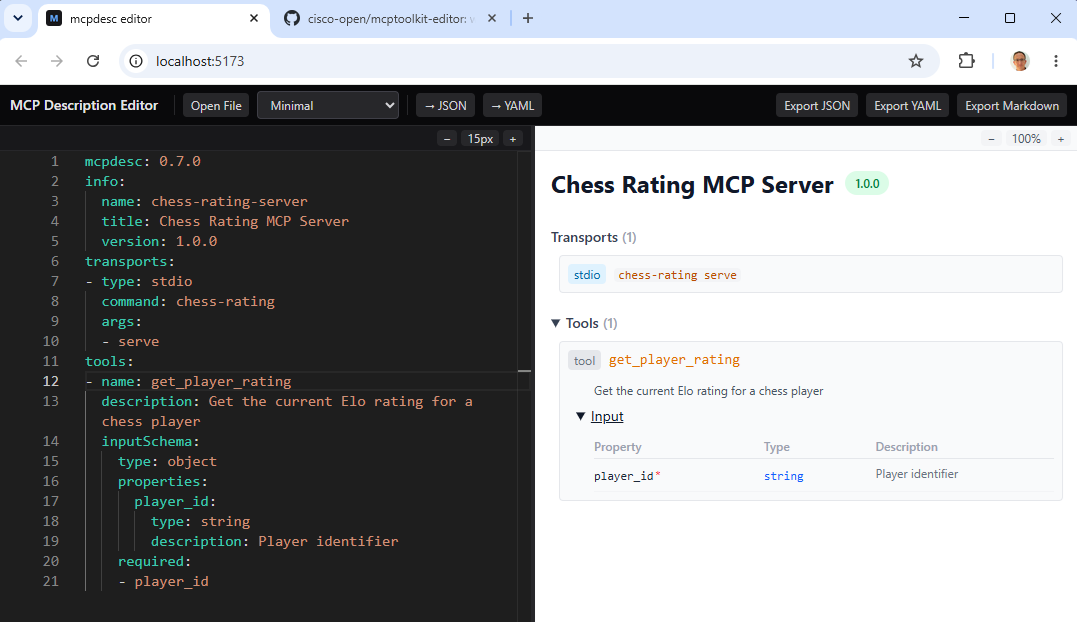
Schema-driven editing
Monaco editor with JSON Schema autocomplete, inline squiggles, folding, and syntax highlighting for JSON and YAML.
Real-time validation
AJV validation against the MCP Description schema, plus semantic warnings for semver, empty capabilities, and duplicate names.
Interactive cards preview
Collapsible cards for server info, transports, security, tools, resources, and prompts. Click any type to jump to its source.
Markdown & export
Render Handlebars documentation, convert JSON ↔ YAML in one click, and export as .mcpdesc.json, .mcpdesc.yaml, or .md.
Generate a description from a live server
Point the mcpcontract CLI at any MCP server to produce anmcpdesc document you can open in the editor:
mcpcontract dump \
  --transport streamable-http \
  --url "https://your-mcp-server/mcp" \
--output server.mcpdesc.jsonYour MCP Description stays in your browser.
No MCP server description content is uploaded to our servers. Edits persist locally via your browser's storage. Analytics only tracks anonymous product usage events.